I Swapped My Garage Access Point and Here Is What the Data Actually Shows
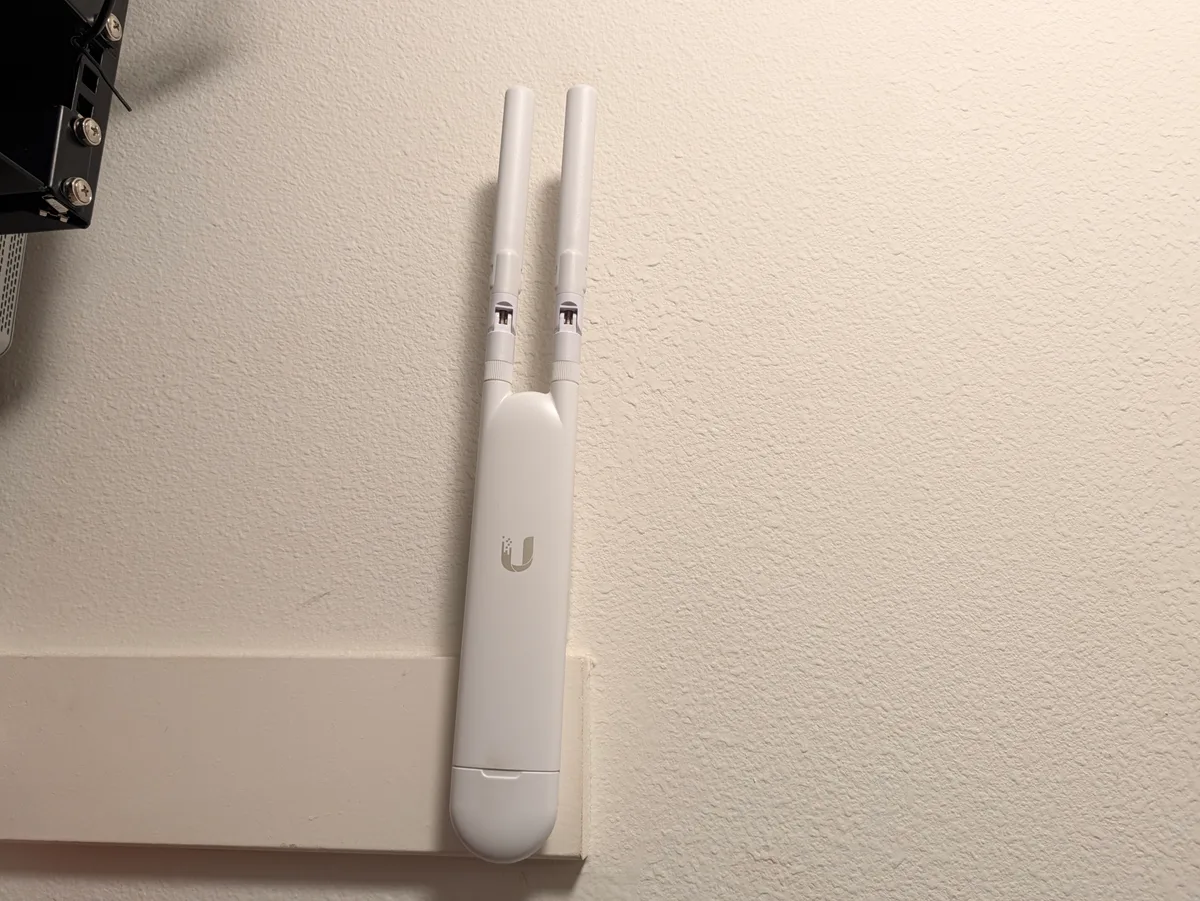
From WiFi 5 bunny ears to WiFi 7 in one afternoon, and what the UniFi API said about both of them.
The setup
I run UniFi throughout my house. For the last few years, a UAP-AC-Mesh has been handling WiFi duty in my garage. If you have ever seen one in the wild, you know why people call it “the bunny ears”. It ships with two external, detachable antennas that stick straight up and look exactly like that.
It has been fine. It worked. But the UniFi dashboard has been showing a persistent yellow warning on it for months, and it was time to find out whether that warning was meaningful or just the controller being fussy. I decided to swap it out for a UniFi U7 Lite (model UAPA693, shortname G7LT) and run diagnostics on both so I could compare apples to apples.
Here is everything I found.
The contenders
UAP-AC-Mesh (the outgoing AP)
| Spec | Value |
|---|---|
| WiFi generation | WiFi 5 (802.11ac Wave 2) |
| Bands | 2.4 GHz + 5 GHz |
| Spatial streams | 2x2 MIMO on both bands |
| Max theoretical throughput | 300 Mbps (2.4G) + 867 Mbps (5G) |
| External antennas | Yes, detachable and directional |
| Architecture | MIPS (legacy) |
| Firmware | 6.8.2 (end of life, no further updates) |
| Max TX power | 20 dBm |
| Street price (new, when current) | ~$109 USD |
| Street price (used today) | ~$30 to $50 |
The AC-Mesh launched around 2018 and was designed as a flexible outdoor and hard-to-wire AP. The external antennas can be swapped for high-gain directional panels (the UMA-D), which is genuinely useful if you need to shoot WiFi across a yard or through a wall. For a garage mount, though, the default antennas are just fine.
It is also worth noting: this AP has reached end of life on firmware. It will not receive security patches or feature updates going forward.
UniFi U7 Lite (the new AP)
| Spec | Value |
|---|---|
| Model | UAPA693 (shortname G7LT) |
| WiFi generation | WiFi 7 (802.11be) + backwards compatible with WiFi 6/5/4 |
| Bands | 2.4 GHz + 5 GHz |
| Spatial streams | 2x2 MIMO on both bands |
| Max theoretical throughput | 688 Mbps (2.4G) + 2882 Mbps (5G) |
| External antennas | No, internal and low-profile |
| Architecture | ARMv7 |
| Firmware | 8.5.21 (actively supported) |
| Max TX power | 23 dBm (2.4G) / 24 dBm (5G) |
| Street price (new) | ~$99 to $129 USD |
The U7 Lite (model UAPA693, internal shortname G7LT) is the entry-level member of Ubiquiti’s WiFi 7 lineup. It skips the 6 GHz band (that is the U7 Pro’s territory), keeps 2 spatial streams, and focuses on getting the WiFi 7 fundamentals into a compact, low-profile form factor at a reasonable price.
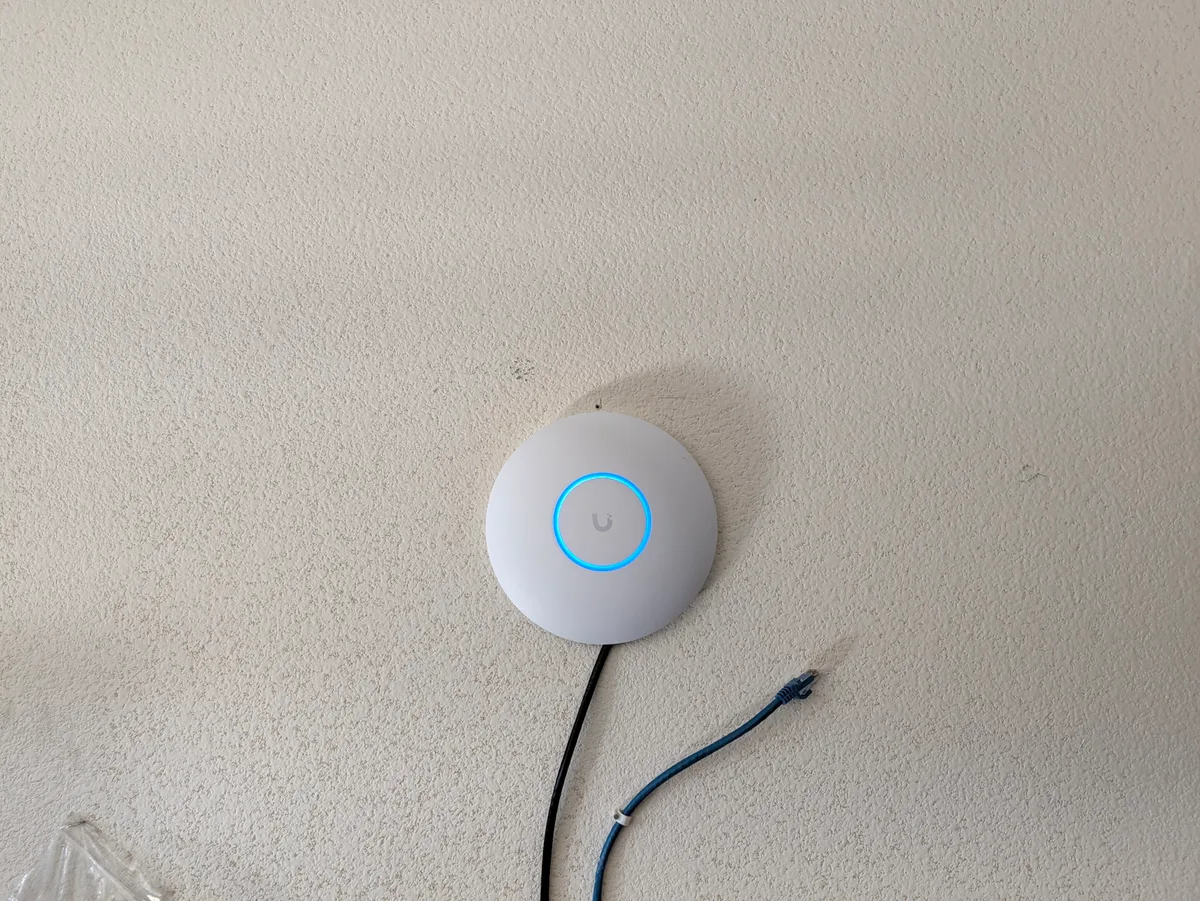
The footprint difference is the part photos actually capture. No antennas to aim, no bracket sticking off the wall, just a disc and a cable.
What WiFi 7 actually changes
WiFi 7 (802.11be) is not just a number bump. A few things it brings that matter in practice:
4096-QAM modulation. WiFi 5 topped out at 256-QAM. WiFi 6 pushed to 1024-QAM. WiFi 7 goes to 4096-QAM. Higher QAM means more data packed into each transmission, roughly 20% more throughput compared to WiFi 6 under ideal signal conditions.
Multi-Link Operation (MLO). This is the headline feature of WiFi 7. A device can maintain simultaneous connections across both bands at once, using whichever path is cleaner at any given moment. On a 2-band AP like the U7 Lite, the benefit is more modest than on a tri-band AP, but it still helps with reliability and latency. Devices that support MLO will see fewer dropped packets during congestion.
Larger resource units. WiFi 7 doubles the maximum channel size to 320 MHz on 6 GHz (not relevant on a 2-band AP) and improves how the spectrum is divided across multiple clients simultaneously through enhanced OFDMA.
Backwards compatibility. If your devices only support WiFi 5 or WiFi 6, they will still connect to the U7 Lite just fine. WiFi 7 APs handle older clients without any configuration change.
The live diagnostic data
Before pulling the AC-Mesh down, I queried the UniFi API for its performance state. Here is what it was reporting after years of service in this spot.
Old AP: UAP-AC-Mesh (at time of removal)
| Metric | Value | Assessment |
|---|---|---|
| Overall satisfaction score | 85 / 100 | OK, not great |
| 5 GHz satisfaction | 69 / 100 | This is the yellow warning |
| 2.4 GHz satisfaction | 89 / 100 | Acceptable |
| 2.4 GHz channel utilization | 72% | Saturated |
| 2.4 GHz TX retry rate | 9.6% | Elevated |
| 5 GHz TX retry rate | 16% | High. Healthy is under 5% |
| 5 GHz ICMP RTT (avg) | 6,643 ms | Over 6 seconds, severe |
| Total clients connected | 21 (17 on 2.4G, 4 on 5G) | Overcrowded on 2.4G |
| Max TX power | 20 dBm | Hardware ceiling |
The yellow warning in the dashboard was real. The 5 GHz radio had a 16% TX retry rate, and healthy APs should sit well under 5%. The ICMP round-trip time on the 5 GHz band was over 6 seconds, which is not a latency number, it is a symptom of a radio that is struggling to maintain clean connections.
The 2.4 GHz radio was pulling 72% channel utilization with 17 clients, spending 47% of its time just receiving. That is a crowded, noisy radio.
None of this is surprising for a 2x2 WiFi 5 AP with 21 clients. The hardware was simply being pushed past what it was designed to handle comfortably.
New AP: UniFi U7 Lite (after ~15 minutes online)
The new AP had only been running for about 15 minutes when I pulled initial numbers, so satisfaction scores were not yet meaningful. But a few things were already visible:
| Metric | Old AC-Mesh | New U7 Lite | Change |
|---|---|---|---|
| 2.4 GHz TX retry rate | 9.6% | 0% | Major improvement |
| 5 GHz TX retry rate | 16.0% | 0% | Major improvement |
| 2.4 GHz TX power | 20 dBm | 23 dBm | +3 dBm |
| 5 GHz TX power | 20 dBm | 24 dBm | +4 dBm |
| Channel selection | Fixed (ch 6 / ch 44) | Auto (ch 1 / ch 149) | Smarter placement |
| Firmware status | EOL | Actively supported | Security benefit |
Zero TX retries on a fresh AP is expected, since it does not have 21 clients on it yet. The TX power difference is more interesting. At +3 to +4 dBm, the U7 Lite is transmitting meaningfully stronger signal from the same mounting spot. In practice that translates to better range and more headroom for clients at the edge of coverage.
Client capacity: how many devices can each AP handle?
This is where the hardware generation gap matters most.
The UAP-AC-Mesh is a 2x2 WiFi 5 AP. Ubiquiti’s own guidance for the AC-Mesh puts comfortable capacity at around 30 to 40 clients. My installation had 21 clients, and the 2.4 GHz radio was already showing strain. The MIPS processor in the AC-Mesh also hits its ceiling faster under high concurrent client load.
The U7 Lite runs on ARMv7, a more capable CPU, and handles the additional scheduling complexity that comes with WiFi 7 features like OFDMA and MLO. Ubiquiti’s guidance for U7-series APs puts comfortable capacity at 60 to 100+ clients depending on workload. Real-world results depend heavily on what those clients are doing, but the architecture gives it significantly more headroom.
For a busy household, a garage, or a small office where you might have phones, tablets, smart home devices, streaming sticks, and laptops all connecting through one AP, the U7 Lite has a lot more room to breathe.
What is actually on the AP
Capacity guidance is abstract until you look at the roster. Here is every client associated with the garage AP, pulled from the UniFi Network API. Data is what each device has moved since it last associated, not a fixed window.
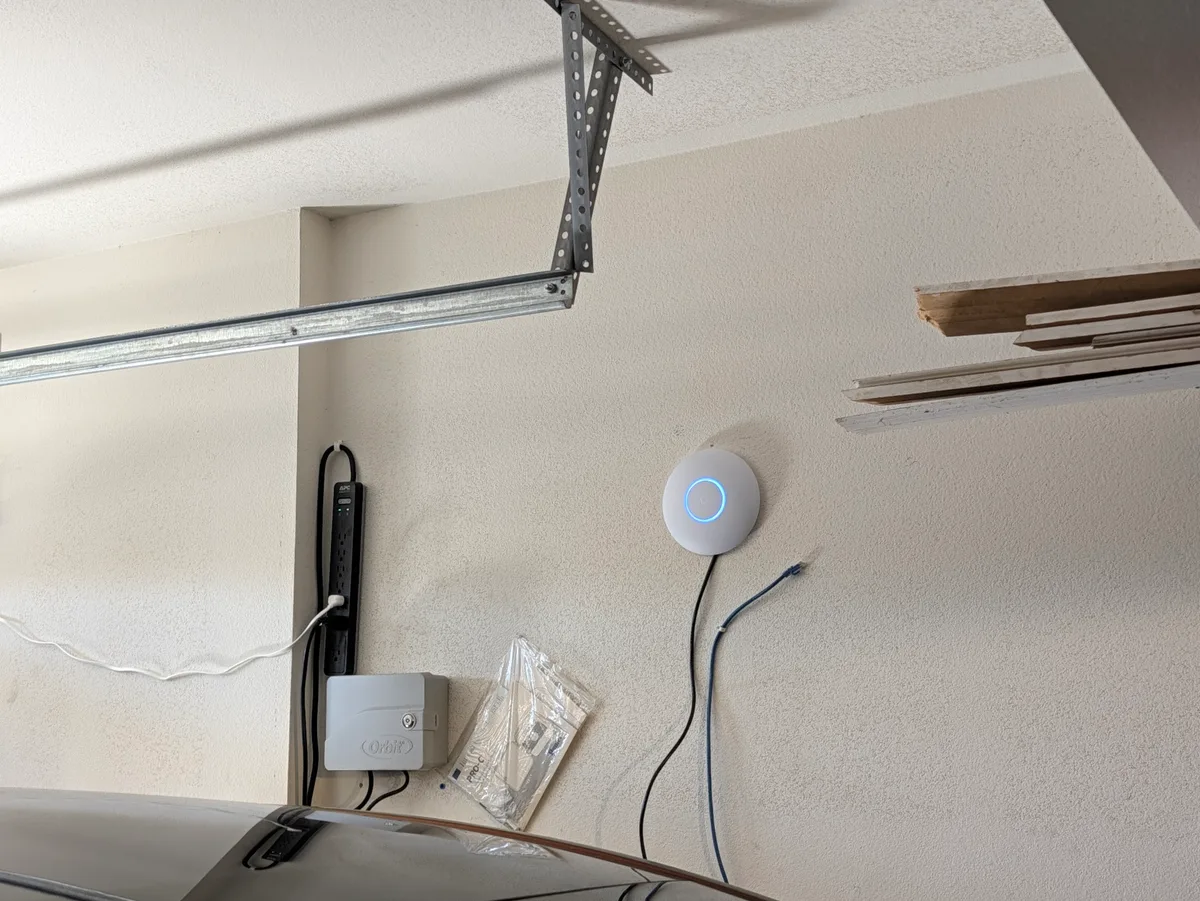
That sprinkler controller on the left is one of the twelve clients in the table below.
| Device | Role | Band | Signal | Data moved |
|---|---|---|---|---|
| Garage Cam 1 | Camera | 2.4 GHz | -54 dBm | 16.13 GB |
| Garage Cam 2 | Camera | 2.4 GHz | -45 dBm | 5.05 GB |
| Garage Cam 3 | Camera | 5 GHz | -46 dBm | 3.67 GB |
| Unknown Device 1 | Unidentified | 5 GHz | -70 dBm | 10.93 GB |
| Unknown Device 2 | Unidentified | 5 GHz | -53 dBm | 0.95 GB |
| Solar Monitor 1 | Energy | 5 GHz | -71 dBm | 0.35 GB |
| Solar Monitor 2 | Energy | 2.4 GHz | -15 dBm | 0.03 GB |
| Garage Light | Home control | 2.4 GHz | -39 dBm | 0.11 GB |
| Garage Door | Home control | 2.4 GHz | -41 dBm | 0.01 GB |
| Sprinkler Controller | Home control | 2.4 GHz | -26 dBm | 0.00 GB |
| Tesla vehicles | Vehicle | 5 GHz | -60 dBm | 0.03 GB |
| Tesla Wall Connector | Charging | 2.4 GHz | -44 dBm | 0.02 GB |
Twelve clients, 37.3 GB total, and the shape of it surprised me. I assumed the cars were the demanding tenants on this AP. They are not close. The two Tesla devices together account for 0.05 GB. The three cameras account for 24.85 GB, two thirds of everything this access point has carried, because cameras upload continuously whether anyone is home or not.
Seven of the twelve are still on 2.4 GHz. That is not a failure, it is what most of this hardware supports: a garage door opener and a sprinkler controller have no reason to carry a 5 GHz radio. But it does mean the crowded band on the old AC-Mesh was crowded with exactly the devices least able to move off it.
Is it worth upgrading?
Short answer: if your AC-Mesh is flagging in the dashboard, yes.
The AC-Mesh was a good AP for its time. If yours is sitting at 100% satisfaction with 10 clients and no warnings, there is no urgent reason to pull it. But if you are seeing:
- Persistent yellow or red satisfaction scores
- High TX retry rates
- Clients in the same room complaining about slow WiFi
- More than 30 devices trying to connect through one AP
…then the hardware is the ceiling, not your internet plan or your router.
The U7 Lite comes in at roughly the same price as the AC-Mesh did new, and it will receive firmware updates and security patches for years to come. The AC-Mesh is already at its last firmware version. From a security standpoint alone, retiring EOL network hardware is worth doing.
If you are upgrading a working AC-Mesh and want to keep the external antenna flexibility (for long outdoor coverage runs, for example), look at the U7 Outdoor instead. If you just need a clean indoor or garage AP, the U7 Lite is the right call.
One thing to check before you swap
If your AP is PoE-powered through an in-wall run, check what that link actually negotiates before you upgrade. WiFi 7 throughput is only useful if the backhaul can keep up, and a run that comes up below gigabit becomes the ceiling no matter how modern the access point on the end of it is. It is a one-line check in the controller and worth doing before you assume a new AP will fix a slow corner of the house.
All performance data in this post was pulled live from the UniFi Network API at the time of the swap. Your numbers will vary based on environment, client types, and interference from neighboring networks.
Leave a comment
Comments are moderated, so it may take a bit before yours appears. Your email is never published.